I have the trojan virus and i cant do anything!?


I caught the trojan virus,and now I cant do anything! First of all, I cant get on safe mode or safe mode with networking, there's no use at all, The last time I did normal boot up it worked,was when I unplugged my Ethernet cable and used wireless. Everything slowed down completely and I cant do anything.Everything restarts and as I said I cant get into safe mode or anything. please help.

trojan virus


Do you have a good antivirus first, If there check whether it is working or not? If you find that is not working just uninstall that antivirus and install the trojan remover first they will provide trial version software and update it. After doing try to go to safe mode and scan the whole computer and reset the windows explorer policies and other settings which are available in the Trojan Remover software.

If you find the not going to safe mode  switch to normal mode and disconnect the Internet, scan the whole computer. I assure you it will remove the trojan. After that install a Norton internet security or Avast free antivirus update the virus definitions and scan the whole computer. Your PC will set right I assure you. If the problem persists, reinstall the windows OS or formatting the drive is only way. If you have any data you will lose while formatting a drive.

My suggestion is install a Norton Internet Security they provide the trial version.

My compurter has been taken over by viruses and my antivirus does not remove viruses. HELP.?

My computer has been taken over by viruses. My anti virus does not remove viruses and any new anti virus I download becomes infected. Need help.

antivirus not working


May be your computer is at high risk, because when you install any antivirus or any other programme it is infected. This means that virus and its infections are very high in your computer. If you insert any USB drive or any external drive, virus might damage your data. Before doing all these if you have any important data take a backup of them.

After taking backup of data, format your OS drive or C drive, After doing the same you need to check with other drives. But I assure you that other drivers like D, E ...etc are also infected. After formatting and loading the OS you need to install the Internet Security, why I am saying Internet Security means it has all the features like spyware, Malware  root kits  virus protection...etc. If you want you can try trial version of Norton Internet Security for 30 days.

After formatting and installing OS dont install any drivers or any other software's  Just install the Internet Security programme. Update the virus definitions  and scan the whole computer. I assure you it detects and removes threats, if that feels good buy full version of the software.

But every time install a security software's  don't overcome that my pc never gets virus or I am sure my USB drive does not infected with virus. Any way so many antivirus programmes are available on Internet, Free version of antivirus is Avast that was good enough to protect your PC. 

Is my computer infected by trojan horse?? See details.?

So whenever I open a web browser (usually Google chrome) and go to any site, my anti virus software always detects 6 trojan virus. I have avast anti virus by the way, its the free one though. I also downloaded some movies and songs through torrent. Maybe that's why. So I scanned my computer and deleted the infected/infectious files. But its still the same, they still detect a virus. So I'm freaking out here. What should I do? Is my computer really infected?

avast free antivirus vs avast internet security


May be your PC is still infected with Virus or Trojans, You need to scan in depth of your system files. Avast free edition has limited features when compared to a Avast Internet Security. One more reason behind this is, in your pc some malware software may be installed once check in the control panel add/remove progrrames. Then check in browsers plugin or extensions there might be some unnecessary plugins installed. If you have found one uninstall it and restart browsers, reset to default settings.

Better install a Norton Internet Security Trial, remove the avast free edition. After Update the norton virus defintions. If any threats found I assure you it will remove the threats. and Run a Full System Scan. Symantec provides the Security software with full features with 30 days trial. After 30 days if you can afford buy a full version of the software.

So many malware sites are there in world wide web, people dont know which they should download or avoid. Installing a Internet Security software will protect your PC from all these types of softwares.

Gateway Laptop stuck on startup?

I have had it since September. Never had any problems with it, until today. The screen got slammed shut and now will not do anything. It gets stuck on the starting windows screen and goes black. I have tried F11 and it does nothing. I have tried rebooting it but it just goes black and 15 minutes later it goes to a grey screen and has the cursor, but won't do anything else! I need help, please.
laptops
Which operating system you have installed? because there might be problem with the boot files, They may corrupted and unable to boot. Once check BIOS as well, check the boot devices list in that check first boot device should be set to hard disk, if not do it and press F10 and save the settings. Make sure that you have loaded operating system. One more reason behind this is your system is infected with viruses, get a good internet security software and scan the whole system.

If you are sure that you have loaded operating system, insert the operating system CD and boot from that cd. At the first screen you will find the options to repair the boot, try to repair it. If not done go to the next step where you will asked to check the license agreement press F8. After it will check for the OS if any previous versions are installed if not it will show you the list. Try to repair. If this screen is not shown, main problem with the file system. In some situations many os lost the File system, I have faced the problem so many times. If you lost the file system you cannot recover the data. If same thing happens to you, you need to delete the partition and create it. Install the OS and follow the procedure.

If you have any data that you lost, download the recover my files software and try to get your data back. It is a good software I assure you it recovers your data.

What's wrong with my internet?

For the past two weeks my connection has been terrible. It gets really bad at around 7 pm to 11 pm and sometimes is bad all day. Anybody have any ideas? Thanks in advance. I have, we talked for an hour and the guy said that I probably had a virus on my computer, so he had me test my connection on another computer and the upload speed came out to be 2 Mbps and the guy said that it's fine. I'm supposed to be getting 5 Mbps  That's almost 5 times slower. Then he tried telling me that I'm lagging on my Xbox because we're watching Netflix at the same time, the thing is, I wasn't on both. Plus it never mattered before if I was doing both at the same time.

why my internet is slow

Might be your PC is infected with Virus or check the data cable, change the cable if you are connecting your PC through a Modem or Switch or Router. You should check the following as well whether the LAN port of your PC is working fine or not. Try inserting the other LAN card on the motherboard and Install the Latest Drivers, connect to the Internet check the speed. If every thing is right, problem is with the on board LAN card. Check the LAN drivers whether correctly installed or not. Go to motherboard manufacturer's site and download the Latest drivers.

Your PC might be infected with viruses or Trojans...etc or any ongoing downloads are going in background. check the applications or If any one around installed a speed limiter software's like Netlimiter, check the add/remove programmes in control and uninstall them. Fault with Internet browsers also is one of the reason, install a new browser don't install or update or uninstall the existing browsers.

If you are connecting through Router using WiFi, you need to check with router settings. Might be Router settings are reducing the speed of your Internet on Desktop.

Why is my laptop's wireless connection so slow?

Recently at school, whenever I try to connect to the internet it is extremely slow. I am on the same network as forty other students, but my connection seems to be the only slow one. Any ideas as to why this is happening?

wireless connection so slow

As you are saying that forty students are connected to same WIFI this means that net will be slow obviously, because it depends on the speed. Assume that you school has 10 Mbps bandwidth and forty students are connected to it, in that 30 of them are watching you tube video and other ten students wont get the internet or the browsing will be slow.

Check your school bandwidth limit first, there are so many features in the Router to limit router. Managed Routers and Unmanaged Routers, Managed Routers have power to limited the speed to certain IP address or to certain MAC address.

check the internet speed , when you all forty students connected to same network on speedtest.net, you will come to know what exactly happening? when you are single in the class room and only you are connected to the internet once check the internet speed, you will come to know that how much speed the management is providing.

There are many reasons for this problem, May be your Laptop is infected with virus or any ongoing download is going on in background like torrents and any windows updates...etc. If you are aware of them check thoroughly. Scan your whole PC with a good Internet Security software's.

If you are downloading alot or browsing alot when connected to Internet, if this is observed by your school management they might be limiting the speed of Internet to your particular IP address or MAC address. If this is done by the management you can change the IP address, if speed limited by MAC address that is not possible to change.

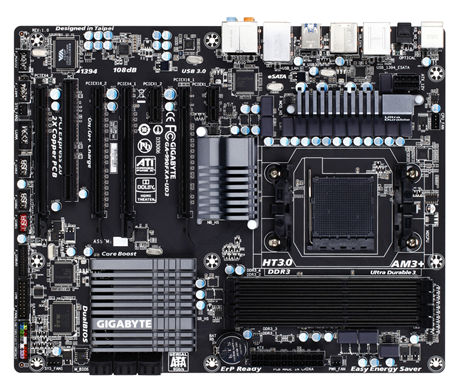
How to install BIOS update on 64-bit windows 7 (GA-990FXA-UD3)?


I have a GA-990FXA-UD3 mobo and i need to update it so i can upgrade my CPU to 8350.
I tried to install it from: http://www.gigabyte.com/products/product-page.aspx?pid=3894#bios

but it says i have an incorrect version (64-bit instead of 32-bit) and I cant find the 64-bit version anywhere. What do I do?

gigabyte motherboard am3

You can update Bios in Many ways, one thing is after updating bios, your may face some minute problems like getting strucked, slow performance..etc beacuse I faced these problems after updating my ASUS K8V-MX motherboard, well I did got some other problems like capacitors failure after I came to know that this problems came into existence because of failure of BIOS. But I am not sure about the problem caused beacause of updating BIOS.

http://www.gigabyte.in/products/product-page.aspx?pid=3894#bios in this link you might be choosing 32bit operating system, downloading the exe file but check which operating system selected by you and download the exe file and follow the on screen instructions. If same problem persists there might other ways to update BIOS.

If you need any technical help, follow this link http://www.gigabyte.in/support-downloads/technical-support.aspx

Gigabyte providing the softwares like qflash and @bios download these softwares from this link http://www.gigabyte.com/webpage/20/HowToReflashBIOS.html

download the latest drivers from the gigabyte official website and in your motherboard drivers CD may contain the previous or old version of drivers. 

It is recommended to install a good anitvirus security or Internet security to get rid of threats